UX / UI Design
Enabled Accurate Estimating for Contractors
Created a component library and solo designed an end-to-end estimating workflow for contractors.
Tools
Figma, FigJam, Jira
Roles
UX Designer, UI Designer
Client
EQS, Inc (StreamLine)
Project Duration
3 Months
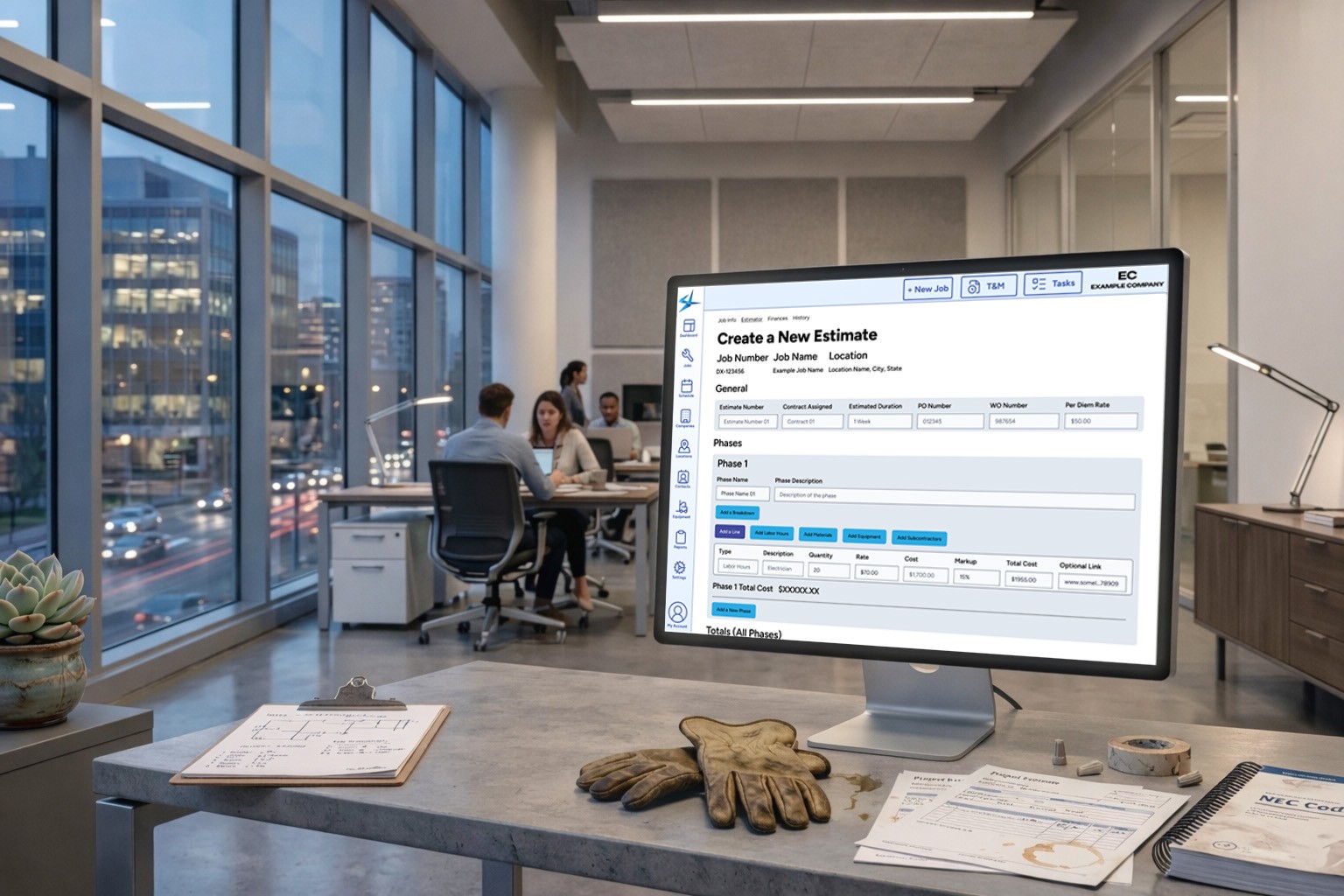
Summary
Finished Live Screen
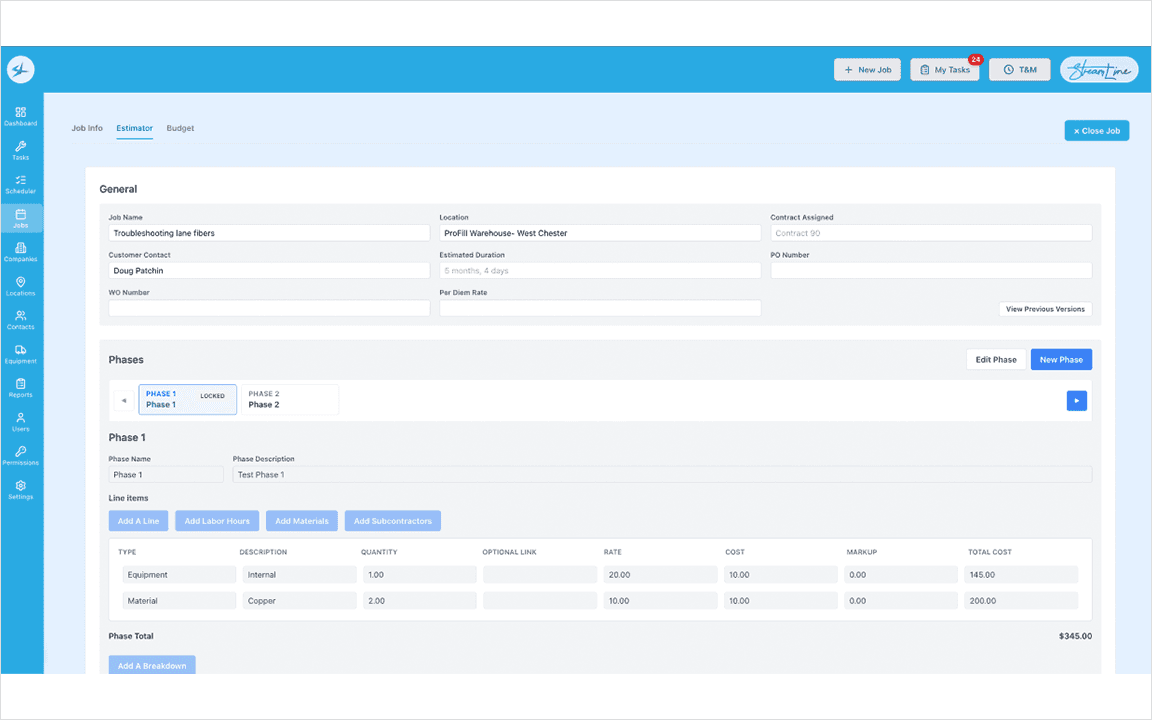
The client's existing software was outdated, bloated, and siloed into Apple devices instead of built to scale. I redesigned this job tracking app for the web with estimating at the center. In the contracting world estimates are the financial foundation that every downstream report builds from.
Context, Goals, & Constraints
This application is built for skilled electricians who need precision in every number they give a customer. Jobs are contract-driven and regulatory heavy, and the estimates produced at this stage feed directly into the reports at the end of the work.
Personas
Estimator
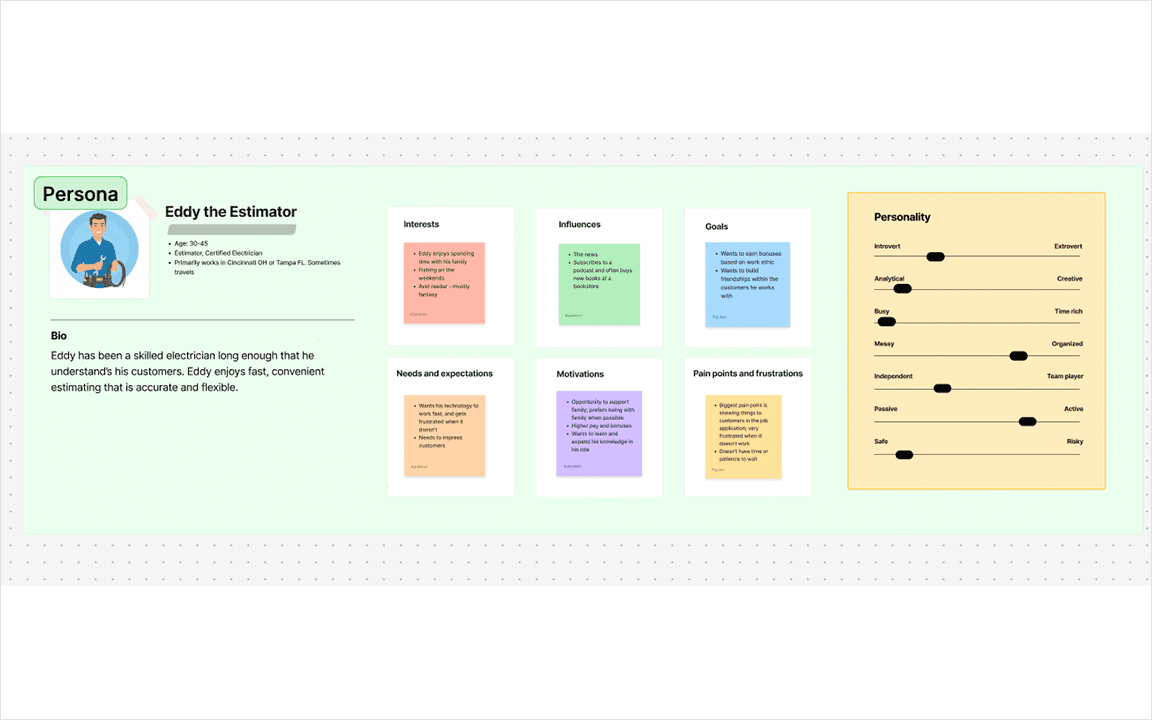
The persona were built from user interviews, informed by five years of firsthand domain experience including on-site time alongside the project managers using this software.
Component library
Some Primitives in the Component Library
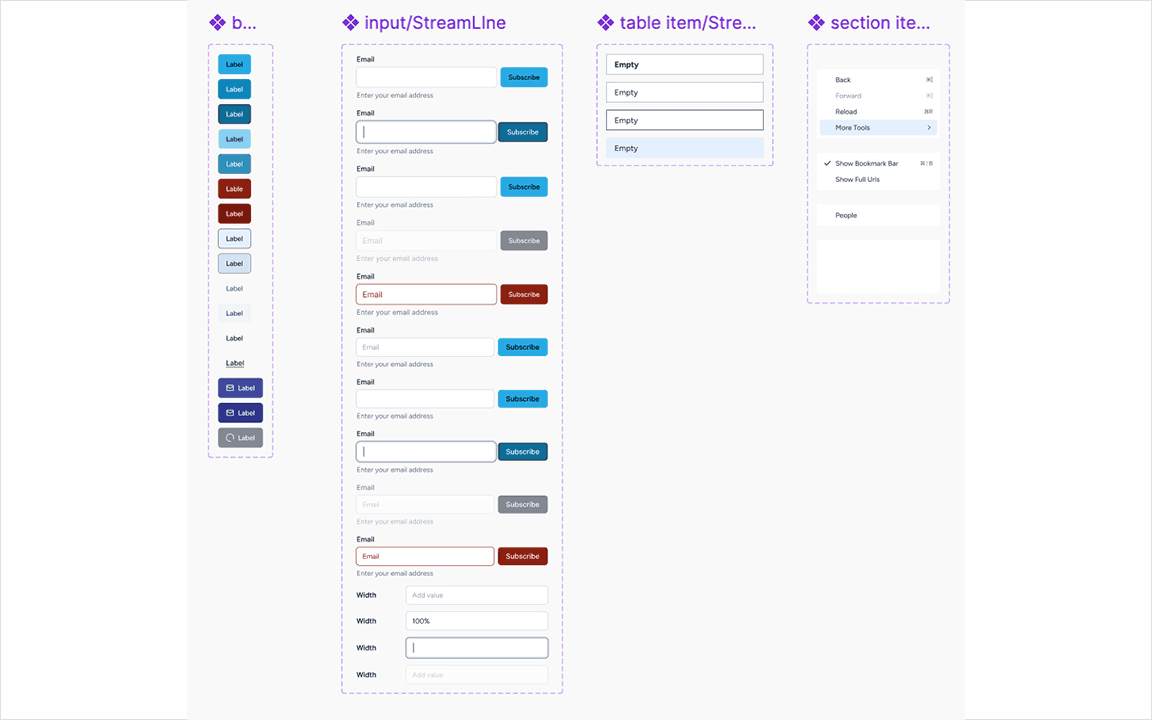
With no design system I had to create one for consistency and faster iteration for this project and future projects. I conducted a user interview with the developer to align with tooling. I evaluated compatible component frameworks and decided that Shadcn UI was the best fit. I customized it with branded styling, accessibly standards, and scalability in mind.
Design Process
Whiteboarding
Used FigJam to Understand Estimate Infrastructure
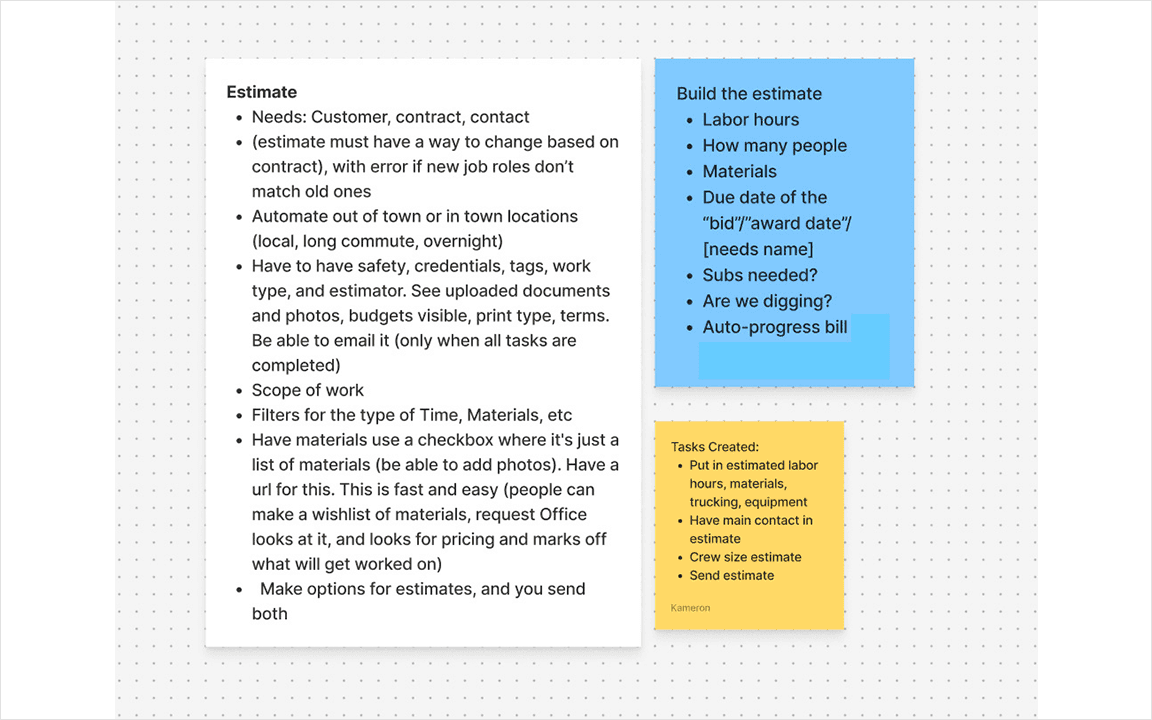
I started with stakeholder meetings to define constraints and identify key research contacts. Notes were drafted in Markdown and refined in FigJam.
Explored Existing User Journey and Critical Changes Needed
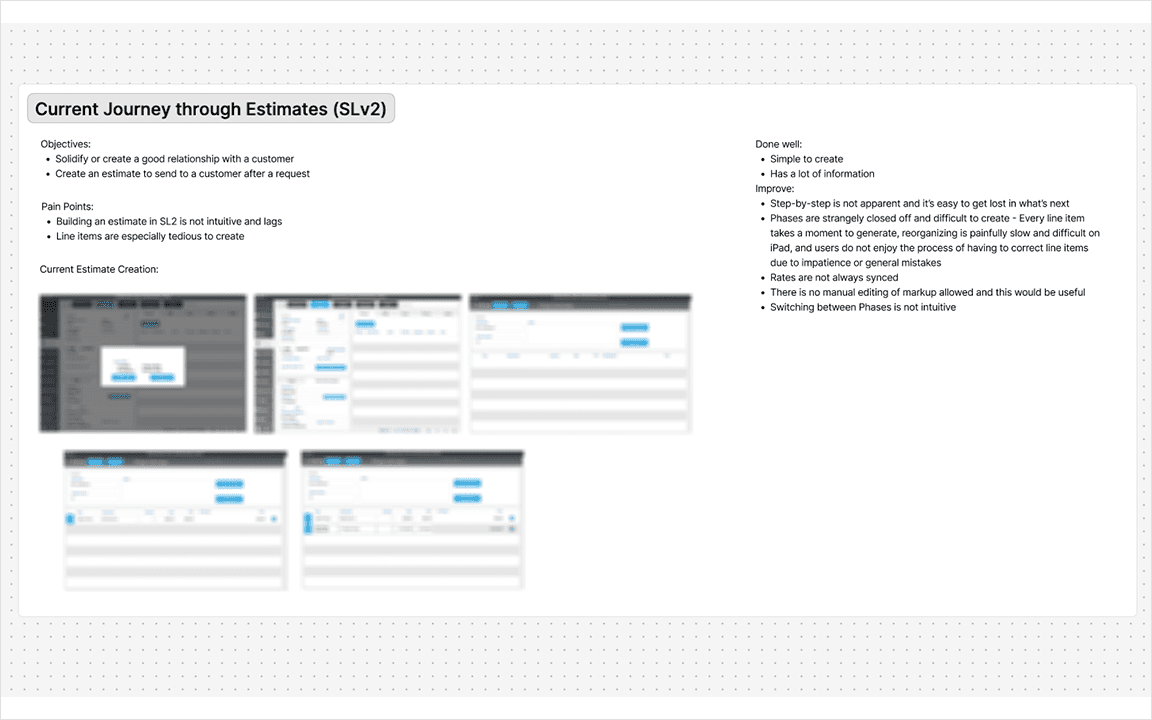
I audited the existing estimating flow before touching anything new. The focus was on the FTUE for maximum clarity. The estimator needed to be approachable enough for first-time users to start building immediately without sacrificing the precision that experienced users required.
Flow
User Flow Creating Estimates
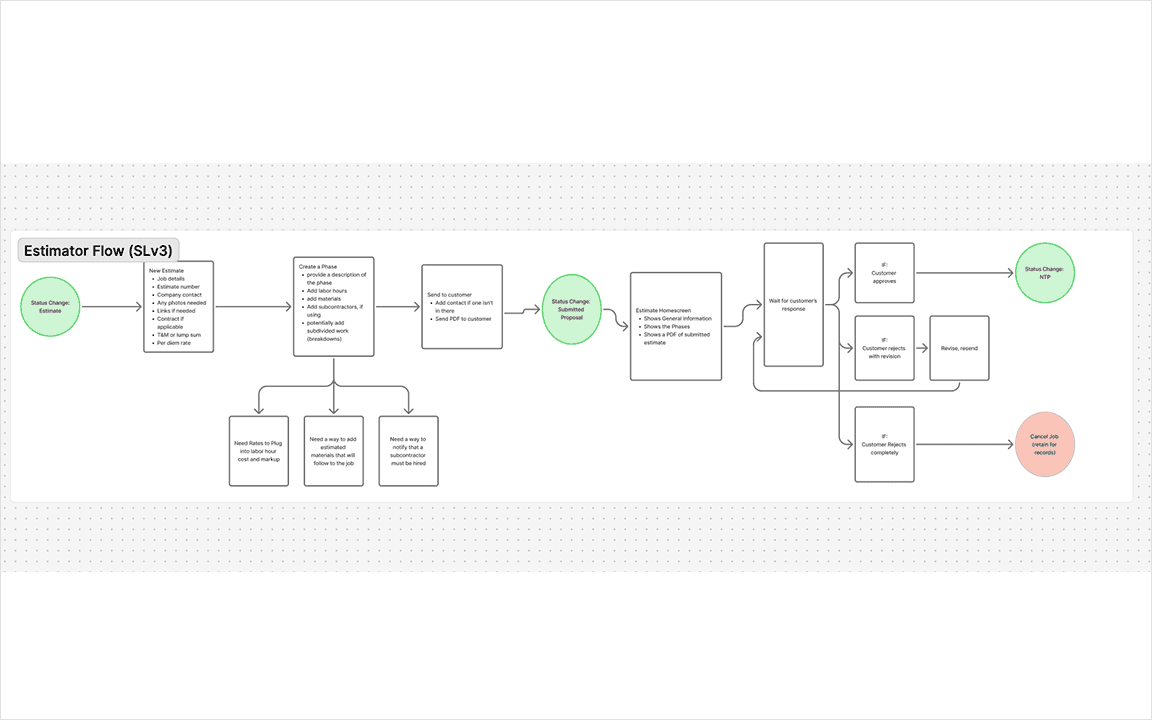
There were three questions that drove the creation of the flow:
What is the end outcome that the user needs?
What are the most common estimating pain points, and which can design actually solve?
How do you keep the process minimal without stripping away what users need?
Wireframing
Estimator Wireframe
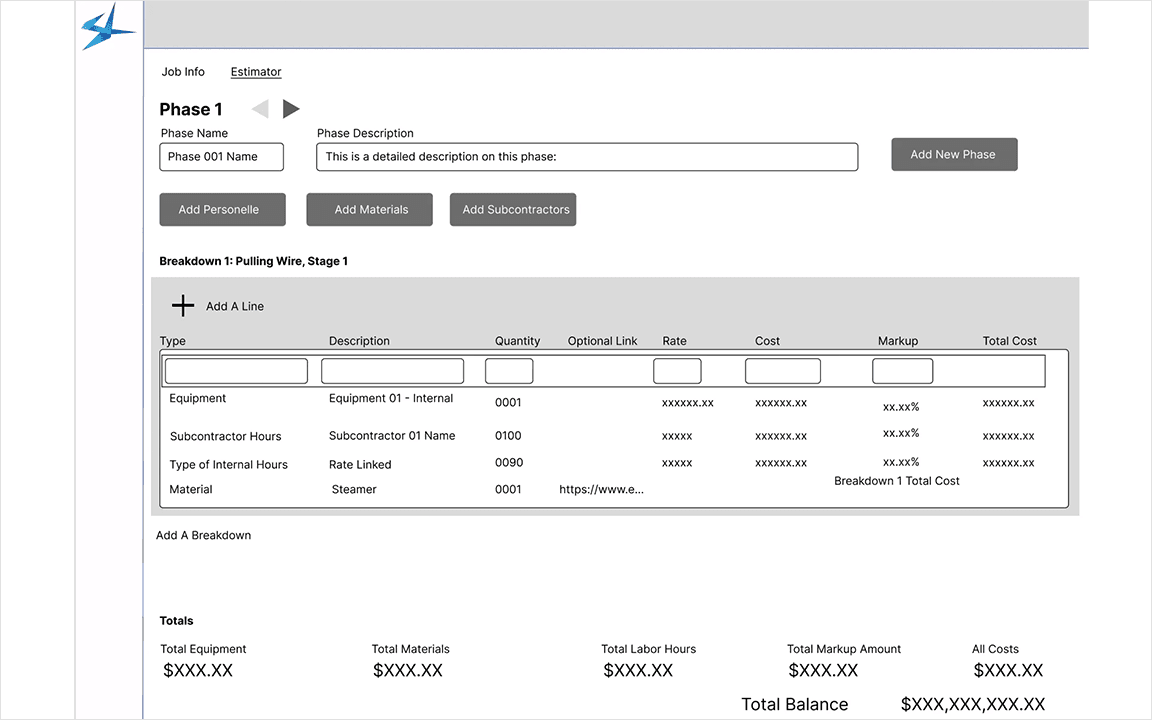
Problem discovered: During wireframing it was discovered that the old system force-scrolled to every new line item and demanded immediate input, making large estimates slow and error-prone to create.
Structural Fix: Line items are inserted below the selected section and users fill in details at their own pace.
Wireframes were prototyped and tested with users to allow feedback to shape iterations.
ALTERNATIVE APPROACHES
Phase Navigation
Before & After
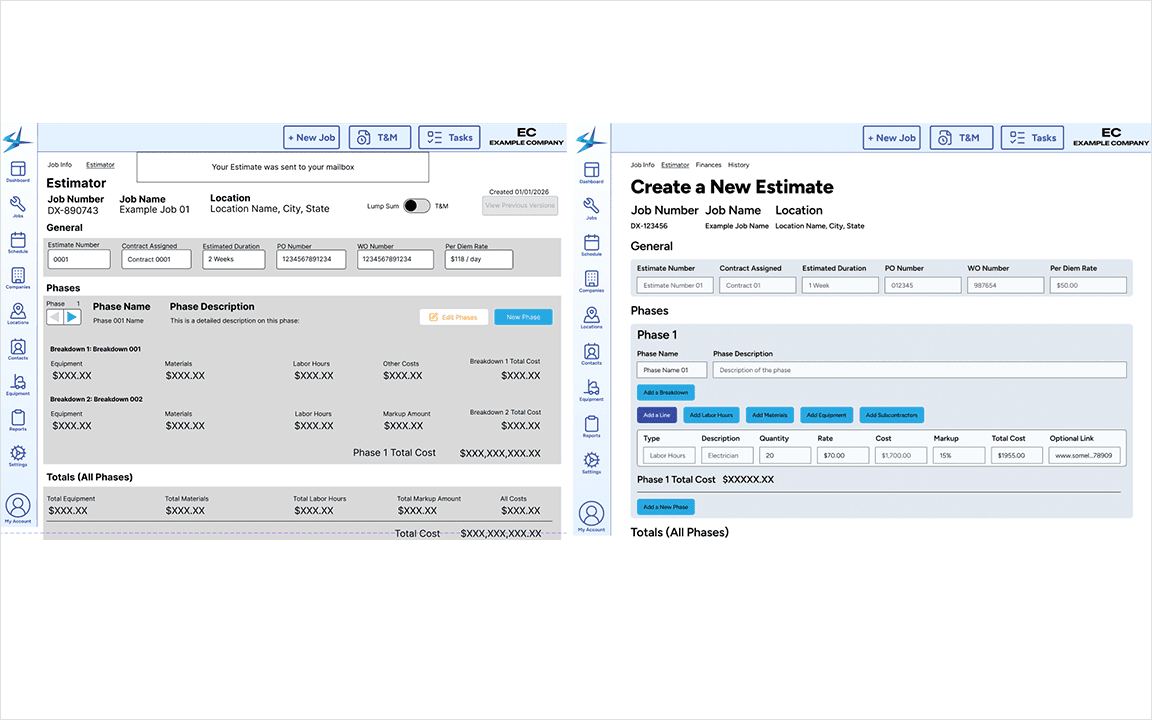
Problem: Users couldn't locate a specific job phase or see relevant phase information without scrolling through the entire list, which was potentially more than 10 phases long.
Solutions:
Replaced the phase selection button with a shelf containing larger, differentiating info buttons
Phase totals condensed into simple breakdowns to avoid cluttering screens
No more hunting through every single phase to find the right one
Adding Line Buttons
Before & After
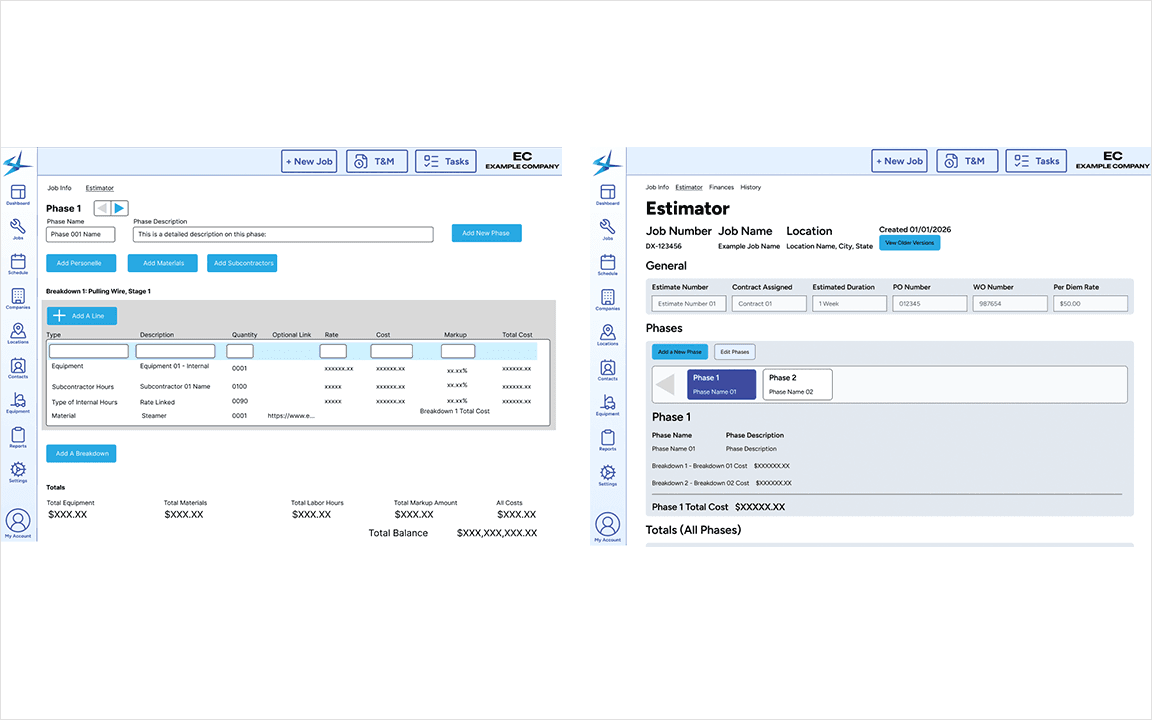
Problem: Stopping to fill out every line item mid-estimate breaks the momentum of adding lines and slows down the process.
Solutions:
Add prominent, easily-clickable "Add a…" buttons
Estimators can now rapidly build out the structure of an estimate then go back and add details
Outcomes & Reflections
Final New Estimate Screen Design
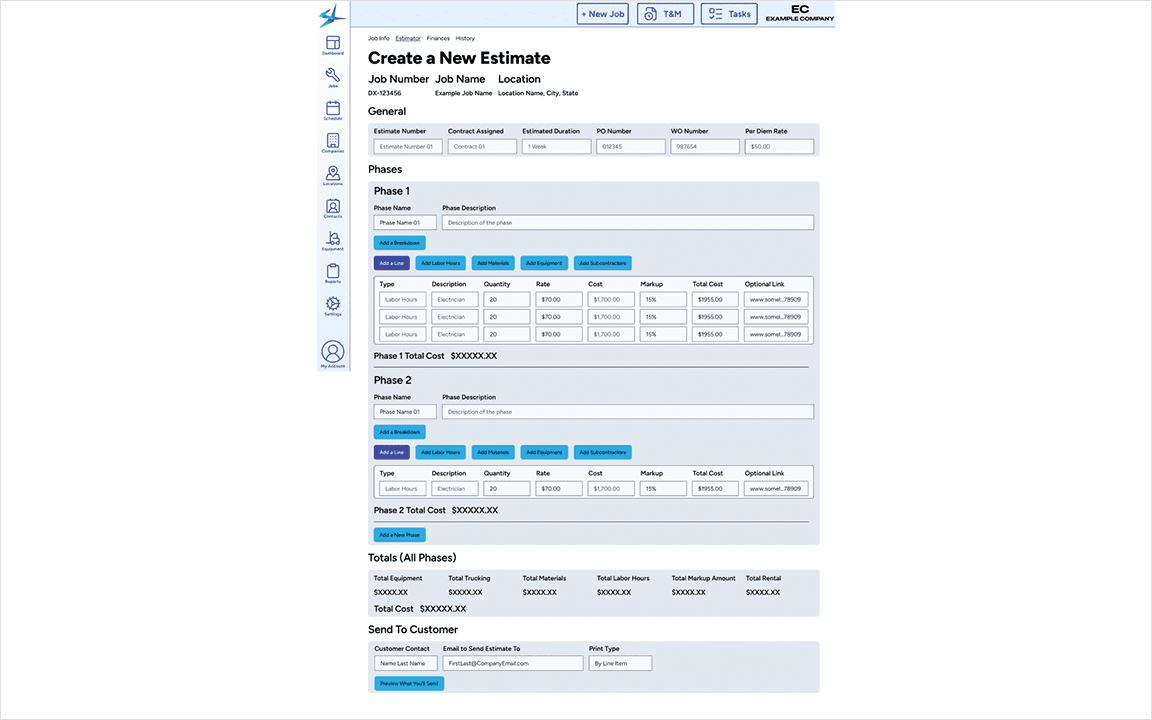
Results:
The estimator is fully implemented and live in the application. The broader system is still in development and has not been released to end users
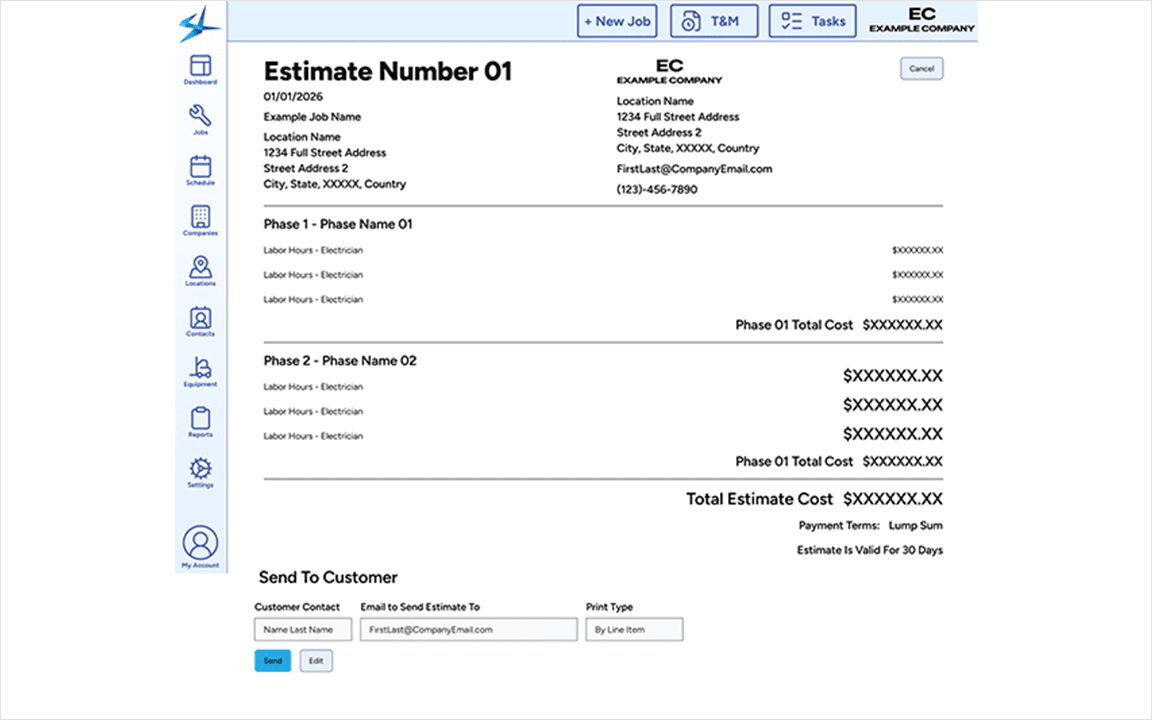
Estimates can be displayed to customers in multiple formats: by Line Item, Phase, Breakdown, and Lump Sum
5-10 users will be using the new estimator
What customers receive:
Faster, more reliable estimate emails
A clear process for handling customer revisions and change requests
Final Estimate Screen For Customer PDF
Reflections:
More frequent user testing throughout development, not just early on, would be more helpful
Component library should be built before wireframing wraps, not after, as it bottle-necked the final design stage
Prior industry knowledge is very valuable but can introduce biases. A larger sample size and research could balance this
More Projects



UX / UI Design
Enabled Accurate Estimating for Contractors
Created a component library and solo designed an end-to-end estimating workflow for contractors.
Tools
Figma, FigJam, Jira
Roles
UX Designer, UI Designer
Client
EQS, Inc (StreamLine)
Project Duration
3 Months
Summary
Finished Live Screen
The client's existing software was outdated, bloated, and siloed into Apple devices instead of built to scale. I redesigned this job tracking app for the web with estimating at the center. In the contracting world estimates are the financial foundation that every downstream report builds from.
Context, Goals, & Constraints
This application is built for skilled electricians who need precision in every number they give a customer. Jobs are contract-driven and regulatory heavy, and the estimates produced at this stage feed directly into the reports at the end of the work.
Personas
Estimator
The persona were built from user interviews, informed by five years of firsthand domain experience including on-site time alongside the project managers using this software.
Component library
Some Primitives in the Component Library
With no design system I had to create one for consistency and faster iteration for this project and future projects. I conducted a user interview with the developer to align with tooling. I evaluated compatible component frameworks and decided that Shadcn UI was the best fit. I customized it with branded styling, accessibly standards, and scalability in mind.
Design Process
Whiteboarding
Used FigJam to Understand Estimate Infrastructure
I started with stakeholder meetings to define constraints and identify key research contacts. Notes were drafted in Markdown and refined in FigJam.
Explored Existing User Journey and Critical Changes Needed
I audited the existing estimating flow before touching anything new. The focus was on the FTUE for maximum clarity. The estimator needed to be approachable enough for first-time users to start building immediately without sacrificing the precision that experienced users required.
Flow
User Flow Creating Estimates
There were three questions that drove the creation of the flow:
What is the end outcome that the user needs?
What are the most common estimating pain points, and which can design actually solve?
How do you keep the process minimal without stripping away what users need?
Wireframing
Estimator Wireframe
Problem discovered: During wireframing it was discovered that the old system force-scrolled to every new line item and demanded immediate input, making large estimates slow and error-prone to create.
Structural Fix: Line items are inserted below the selected section and users fill in details at their own pace.
Wireframes were prototyped and tested with users to allow feedback to shape iterations.
ALTERNATIVE APPROACHES
Phase Navigation
Before & After
Problem: Users couldn't locate a specific job phase or see relevant phase information without scrolling through the entire list, which was potentially more than 10 phases long.
Solutions:
Replaced the phase selection button with a shelf containing larger, differentiating info buttons
Phase totals condensed into simple breakdowns to avoid cluttering screens
No more hunting through every single phase to find the right one
Adding Line Buttons
Before & After
Problem: Stopping to fill out every line item mid-estimate breaks the momentum of adding lines and slows down the process.
Solutions:
Add prominent, easily-clickable "Add a…" buttons
Estimators can now rapidly build out the structure of an estimate then go back and add details
Outcomes & Reflections
Final New Estimate Screen Design
Results:
The estimator is fully implemented and live in the application. The broader system is still in development and has not been released to end users
Estimates can be displayed to customers in multiple formats: by Line Item, Phase, Breakdown, and Lump Sum
5-10 users will be using the new estimator
What customers receive:
Faster, more reliable estimate emails
A clear process for handling customer revisions and change requests
Final Estimate Screen For Customer PDF
Reflections:
More frequent user testing throughout development, not just early on, would be more helpful
Component library should be built before wireframing wraps, not after, as it bottle-necked the final design stage
Prior industry knowledge is very valuable but can introduce biases. A larger sample size and research could balance this
More Projects
UX / UI Design
Enabled Accurate Estimating for Contractors
Created a component library and solo designed an end-to-end estimating workflow for contractors.
Tools
Figma, FigJam, Jira
Roles
UX Designer, UI Designer
Client
EQS, Inc (StreamLine)
Project Duration
3 Months
Summary
Finished Live Screen
The client's existing software was outdated, bloated, and siloed into Apple devices instead of built to scale. I redesigned this job tracking app for the web with estimating at the center. In the contracting world estimates are the financial foundation that every downstream report builds from.
Context, Goals, & Constraints
This application is built for skilled electricians who need precision in every number they give a customer. Jobs are contract-driven and regulatory heavy, and the estimates produced at this stage feed directly into the reports at the end of the work.
Personas
Estimator
The persona were built from user interviews, informed by five years of firsthand domain experience including on-site time alongside the project managers using this software.
Component library
Some Primitives in the Component Library
With no design system I had to create one for consistency and faster iteration for this project and future projects. I conducted a user interview with the developer to align with tooling. I evaluated compatible component frameworks and decided that Shadcn UI was the best fit. I customized it with branded styling, accessibly standards, and scalability in mind.
Design Process
Whiteboarding
Used FigJam to Understand Estimate Infrastructure
I started with stakeholder meetings to define constraints and identify key research contacts. Notes were drafted in Markdown and refined in FigJam.
Explored Existing User Journey and Critical Changes Needed
I audited the existing estimating flow before touching anything new. The focus was on the FTUE for maximum clarity. The estimator needed to be approachable enough for first-time users to start building immediately without sacrificing the precision that experienced users required.
Flow
User Flow Creating Estimates
There were three questions that drove the creation of the flow:
What is the end outcome that the user needs?
What are the most common estimating pain points, and which can design actually solve?
How do you keep the process minimal without stripping away what users need?
Wireframing
Estimator Wireframe
Problem discovered: During wireframing it was discovered that the old system force-scrolled to every new line item and demanded immediate input, making large estimates slow and error-prone to create.
Structural Fix: Line items are inserted below the selected section and users fill in details at their own pace.
Wireframes were prototyped and tested with users to allow feedback to shape iterations.
ALTERNATIVE APPROACHES
Phase Navigation
Before & After
Problem: Users couldn't locate a specific job phase or see relevant phase information without scrolling through the entire list, which was potentially more than 10 phases long.
Solutions:
Replaced the phase selection button with a shelf containing larger, differentiating info buttons
Phase totals condensed into simple breakdowns to avoid cluttering screens
No more hunting through every single phase to find the right one
Adding Line Buttons
Before & After
Problem: Stopping to fill out every line item mid-estimate breaks the momentum of adding lines and slows down the process.
Solutions:
Add prominent, easily-clickable "Add a…" buttons
Estimators can now rapidly build out the structure of an estimate then go back and add details
Outcomes & Reflections
Final New Estimate Screen Design
Results:
The estimator is fully implemented and live in the application. The broader system is still in development and has not been released to end users
Estimates can be displayed to customers in multiple formats: by Line Item, Phase, Breakdown, and Lump Sum
5-10 users will be using the new estimator
What customers receive:
Faster, more reliable estimate emails
A clear process for handling customer revisions and change requests
Final Estimate Screen For Customer PDF
Reflections:
More frequent user testing throughout development, not just early on, would be more helpful
Component library should be built before wireframing wraps, not after, as it bottle-necked the final design stage
Prior industry knowledge is very valuable but can introduce biases. A larger sample size and research could balance this